Theory: Strawman Design

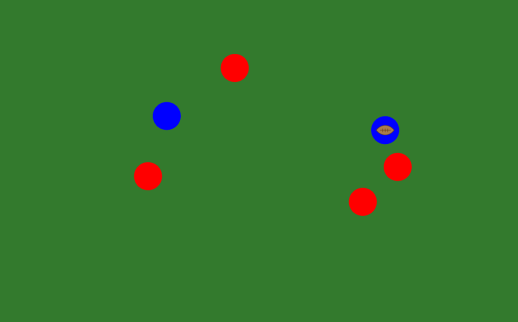
Sometimes you need a mechanic to do something. It doesn’t need to be a good mechanic, or at least that isn’t necessary yet. All you want is something that enables you to test another element of the design. In those cases, a strawman mechanic is what you’re looking for.

“Strawman” mechanics are an idea I got from Frank Lantz. They’re the dumbest, simplest things that do what you need done. Having strawmen in place makes it possible to test other aspects of the game; getting a high score may not be a great goal for your platformer, but it might be enough if you simply want to incentivize jumping so you can work out physics problems.

In addition, strawman mechanics provide a baseline against which other ideas can be judged. New mechanics have to work as well as, or preferably better than, the strawman. If they don’t, they don’t make the cut. This seemingly-trivial test will eliminate a lot of possibilities!

It’s often difficult to get all the aspects of a game right at once. You’ll find yourself needing to prop up one side of a game in order to work on the other. Let a strawman mechanic take that weight; it’ll keep your game in testing now, and help you choose a better system later.
Pathfinding Attacks

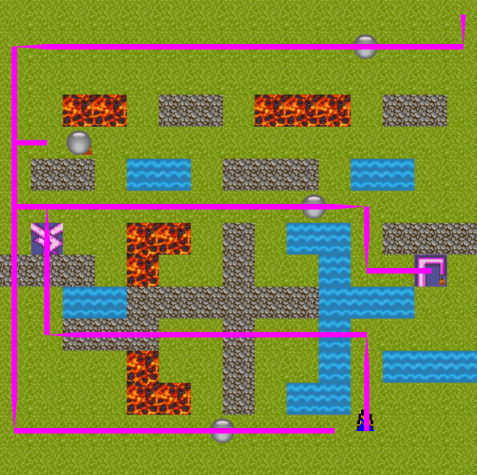
An odd concept, much in need of tuning but with the hint of a useful idea.

screen-shot-2016-10-24-at-9-55-21-pm

Players can choose from either of two weapons. Once pathfinds sensibly to the opponent. The other uses a random heuristic; it will get to the opponent eventually, but using a likely sub-optimal route that covers a lot more ground. Do you want to go for the throat, or control space?

The Joys of Version Control

Some advice I had occasion to give to first-year MFAs today, but that I’m confident is right for everyone: if you’re a digital designer, learn and use some kind of version control. Use it for everything. That includes your prototypes, your quick projects, everything, without exception. It substantially improves your ability to recover from failed experiments (and, thus, your comfort with necessary experimentation) even if you never have to recover from a drastic loss.

Link: Red Blob Games

Computers do all sorts of great things. Unfortunately, taking advantage of a computer’s unique capabilities–pathfinding, generating content mathematically, effortless line-of-sight evaluations, etc.–can involve getting through substantial technical barriers. If you’re being kept from your design goals by one of those walls, I strongly recommend taking a look at Red Blob Games.

Red Blob Games does two things that are very, very useful in providing code help. First, it has lots of examples. Second, and perhaps more importantly, it explains clearly how things work. The examples are all the more useful as a result, and it’s (relatively) easy to envision the changes needed to build the implementation you need for your particular project.

Some ideas hinge on a technical thing that must work. If your technical thing is on Red Blob Games’ pages, that’s a big head start. Give them a look.

Link: Eric Lang on Design & Development

One of the hardest things to figure out, when I was just starting to design games, was the workflow. What was the to-do list? How would I know when I had done a good job at any given step?

This series of tweets by famed tabletop designer Eric Lang offers one possible answer. He explains what design-and-development system made famous by Wizards of the Coast looks like when done properly. It’s a valuable set of guideposts for those looking for a way to structure their design experience.

Wargames Study: Little Wars

I suspect that many people have developed the essentials of H.G. Wells’ Little Wars on their own. At its core, one tries to knock over the other player’s toy soldiers with a projectile before they do the same to yours; I played a similar game with my father as a child, and I’m sure I’m not the only one. Committing simple rules to print, though, helps emphasize Wells’ central idea: “[t]hings should happen, and not be decided.”

We take it for granted that things are decided in games, usually by a system constructed for the purpose. Yet, there’s something remarkable about resting on “what happens” instead of “what the rules tell us happened.” It feels natural and immediate; the toy soldier is out of play because he was knocked over. How could it be otherwise?

It couldn’t. There’s no intermediate step to Little Wars combat, no opportunity for the excitement to dribble out of the resolution process. Our intuition tells us the soldier is lost, and instantly he is.

There are lots of other things to say about Little Wars. Charles Pratt accurately pointed out that its playful, toylike quality defuses the concern for precision that can make miniatures games fiddly; whether that trooper got knocked 1/16″ or 1/8″ to the left when he was tapped accidentally is irrelevant, because it’s the same challenge to hit him with a projectile either way. Little Wars is also a melding of dexterity and tactical play in a way that disappears from the strategy genre thereafter. It’s got as much in common with modern basketball and American football as it does with Warhammer.

Yet, I can’t get away from the sense of immediacy as the truly gripping element of Little Wars. “Things should happen, and not be decided.” How many games could follow that advice? How often could the system be refined, or cut away, to enable things to happen?

Link: GameMaker Humble Bundle

It’s that time again!

For another 14 hours, you can pick up a whole lot of GameMaker content on Humble Bundle. Everything I said the last time this happened is still true: GameMaker is powerful, yet still great for beginners, and the source code included with the bundle’s upper tiers is great as a learning resource. If you’re interested in getting started with digital design, the $15 bundle on offer here is an excellent way to go.

Prototyping: Online Resources

I use the same sites over and over in my prototypes, and while I credit individual contributors there’s rarely a chance to mention the sites as a whole. Let’s rectify that here.

Freesound.org is a great resource for sound effects. It’ll rarely have exactly what you want, but it probably has something close enough to be worth editing into the right form.

If you’re looking for music rather than effects, the Free Music Archive is just the ticket. Aesthetic preferences make it harder, in my experience, to find “just right” music than SFX–and of course, editing music is more difficult as well. Nevertheless, it’s a valuable resource.

Art isn’t trivial to come by, but I get a lot of use out of Game-icons.net. Easy-to-parse and attractive is what I want for prototypes.

When it’s time to use colors (e.g., for layouts), Adobe has a database of attractive color swatches. Their tool for automatically applying color theory is remarkable, too.

Font Squirrel has become my go-to site for typographical assistance. It gets bonus points for making it easy to tell up front how the different fonts are licensed.

All of these sites have been very helpful to me. I highly recommend giving them a look; I expect you’ll find them the same.