PSA: X-Wing Storage

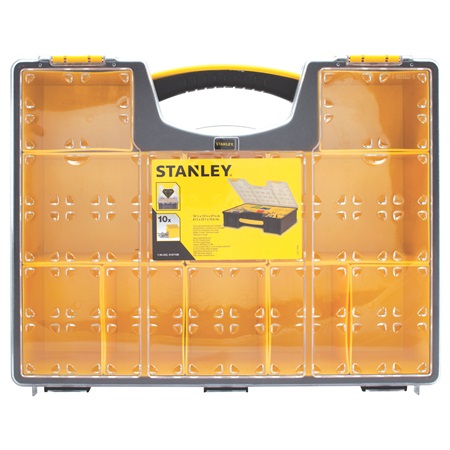
If you’re a player of Fantasy Flight’s X-Wing minis game, and you’re trying to figure out how to store the pieces, look no further than this:

Stanley Organizer

This unprepossessing device is intended for organizing nails and screws, but it’s ideally sized for X-Wing miniatures. Each of the smaller bins is the perfect width, height, and depth for two normal-sized fighters in their plastic packing, along with cards and stands. The larger bins in the middle row hold mid-size vessels with just a little trimming of their packaging.

1-15-15 - X-Wing Storage

At less than $20, and offering protection easily comparable to much more expensive storage/transport solutions, I can’t recommend these organizers highly enough.

Theory: Compartmentalize Costs

Costs in games are a double-edged sword. It’s easier to balance games with more costs associated with their cards/pieces/etc., since there are more knobs to turn. Yet, the more costs there are, the greater the player’s mental overhead. Adding more costs can be valuable, then, but they should be compartmentalized so that the player only needs to think about one or two of them at any point during the game.

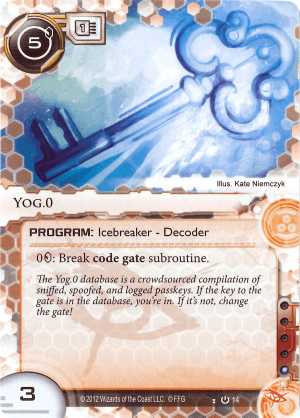
FFG’s Netrunner is a superb example of compartmentalizing costs. Take a look at this Netrunner card, which represents a program used by the game’s hackers:

8-17-15 - Yog.0

This card has three costs. First, there’s a monetary cost to put the card into play (the 5 in black in the upper left). Second, the program has a memory cost, denoted by the 1 in a chip just to the right of a monetary cost; players can normally have up to four memory’s worth of programs in play at a time, and this takes up one of them. Finally, the single pip in a row of five at the bottom-right indicates that Yog.0 costs one influence during deckbuilding.

Having three costs (separate and apart from the fourth cost to use the card’s ability) is a lot. Fortunately, Netrunner lightens the player’s load by putting the costs in separate game-stage compartments. Influence is only relevant while building a deck, and never matters during play. Cost and memory might influence deckbuilding, but they don’t have a rules-based role at that stage; they only need to be tracked precisely later, while the game is in progress. This compartmentalization means that the player only ever needs to track a maximum of two costs at once.

Of course, even two costs is enough that mistakes can be made. I once saw a video of a tournament Netrunner match in which a player had five memory’s worth of programs for the better part of the game. Neither player noticed.

Like all design rules, the rule of compartmentalization has exceptions. Starcraft, which effectively makes attention a game resource, is perhaps the classic example: we’ve all been told to “SPAWN MORE OVERLORDS” because we forgot to check how much available supply we had left. Starcraft is a fast-paced game that’s intended to test your ability to divide your focus and juggle lots of things without dropping any of them, and satisfying many costs (minerals, gas, supply, build time)  is part of the challenge.

At the far side of the spectrum from Starcraft is Hearthstone:
11-14-14 - Hearthstone Card

One cost, noted in the gem in the upper-left, with a computer enforcing the rules so that you can’t forget to pay it. This is great for the more lighthearted game that I have the sense Hearthstone is meant to be, though it does put a lot of weight on the designers, who have fewer balancing knobs to turn.

Fine-tuning balance makes a designer want more costs–but every new cost is one more thing players are going to have to keep track of. Be mindful of how much effort players are being asked to expend dealing with costs, and compartmentalize them to make things easier–or, if you’re going to go the other way, be sure your game is as amazing as Starcraft. 😉

Theory: Providing Zero-Level Heuristics

Suppose a brand-new player understands the rules to your game, and further has a general grasp of what each of the available options is meant to accomplish. The next thing that player needs is a zero-level heuristic: a rule of thumb that guides the new player’s tactical decision-making. Providing zero-level heuristics makes people’s first games more enjoyable, which tends to ensure that they’ll come back for a second.

We’ve talked about this issue before in the context of chess. It’s not hard to understand the rules of chess, but it’s very difficult for a new player to figure out what moves might be good. “Capture the opponent’s king”—yes, but how? It’s not easy to envision how one might get there from chess’ neutral starting point, and many people won’t grind through the frustrating initial games required to develop basic strategies.

Luckily, there are a number of ways to provide zero-level heuristics. Here are a couple of options; I’m sure there are more.

1. Player powers

Making players better at doing things tends to suggest that they should do those things, which gives them a basic goal to get them through their first few turns. Pandemic’s medic is a great example. As soon as someone gets the medic role, they know they should be treating diseases; that simple guideline will be enough to carry them until they’re in the swing of things and able to engage with the game’s decision-making more fully.

The recently-released starter set for Warhammer 40,000’s Space Marines uses a similar technique. It comes with a special rule for the pieces within; roughly speaking, the leader can make some of the other models stand their ground and fire twice in one turn. New players will naturally want to take advantage of that rule—and while doing so, they’ll discover that their troops are very good shots! That knowledge will help them plan their turns going forward.

2. Graphic design

Imagine a board laid out in an elaborate series of fractal spirals. Should you go left? Right? Who knows! The board twists in on itself, again and again, defying any attempt to parse the game just by looking at it.

By contrast, imagine a board that’s a straight line with “start” on one side. Everyone knows what to do with that board: get to the other side. Long experience with other games will tell new players that any move that gets them closer to the opposite end is probably good. Relying on that intuition will get them underway.

(Implicitly, this means that you probably shouldn’t create straight-line boards with “start” on one side when the goal is not to reach the other end.)

Obviously, not every game can have a linear board. However, many can have “juice” that tells new players what to do. Sparkles when they make a good move; bright, strong lines pointing toward one of the actions on the play aids; color-coded actions with the most basic and important actions being the same color as the goal on the board. Just about any game can use its art to communicate what a new player should focus on.

3. Give a small number of very good options

By and large players want more options. There are occasions when it’s appropriate to give them fewer, however, and the period in which you need to give new players zero-level heuristics is one of them. Allowing a player only a couple of choices that all lead to obvious gains ensures that they’ll begin the game by seeing something they can do to progress.

Advanced Civilization executes this technique brilliantly. There’s a lot going on in Advanced Civ, but in the first turn all the player can do is expand to a single new space. Both of those spaces will then produce an additional figure for the player to work with. Expansion is central to the game, and so new players get to take a turn (a) figuring out how to do it and (b) discovering its power; with that knowledge they can focus on expanding for the next several turns and do just fine.

Taken by the hand

Zero-level heuristics don’t take over for new players. Rather, they help make first games entertaining by providing context and the information necessary to evaluate options. Give thought to how you can provide zero-level heuristics as you work on the new player experience; those just picking up your game will thank you for it.
Unity UI: Backgrounds

A question for the group: how do you handle placing UI images against a background in Unity? I’m looking to create a title screen with a consistent look across different screen resolutions and aspect ratios; my goal is that UI elements will always appear in the same place relative to a background image that provides frames for them. At the moment the UI elements move around more than I’d like when viewed on different screens. Any tips or tricks?

Global Game Jam 2016

Sign-ups are open for Global Game Jam 2016, being held on the last weekend of this month. If you’re free, I would urge you to take part. Game jams are a great way to develop new skills, practice existing ones, and even break through creative barriers by working with new people and getting exposure to new ideas.

Don’t feel constrained by any worries you might have about your technical skills. The Global Game Jam allows for board games, card games, etc. Even if you do end up on a team making a digital game, there’s always room to take duties other than coding.

Game design is, depending on your point of view, either an art or an applied science. Either way, the only way to get better at it is to practice. Game jams are an ideal way to put a lot of practice into a small time frame; take advantage of the opportunity!


In the Lab: Porting Phalanx

I’m very proud of Phalanx, but the specific changes and improvements that people have suggested for the next iteration aren’t easy to do in HTML5. Furthermore, Phalanx’s assets are starting to be a bit much for web publishing; there’s already noticeable lag as the game loads, and every further bit of juice is going to make that worse. Those two factors are driving me to re-implement the game in Unity.

As I do so, I’m taking the opportunity to clean up Phalanx’s code. During the rapid prototyping process that brought the game to life I was focused on “does this work,” and not especially concerned about optimization. While it’s not a taxing game to run even in that non-optimized state, there are some areas–particularly in how pieces determine whether the space they want to move into is open–where there’s room for improvement. This is clearly the right time to take care of them.

Needless to say, the changes in architecture have produced a new round of logic errors. 😉 Such is the way of things, I’m learning.

If you need me, I’ll be in the trenches . . . .

The Top 10 Things I Learned in My First Semester, #1

Work with designers who aren’t like you. Designers who share your interests and background are fun to team up with, and you can learn a lot from them, but there are some barriers you can only break through with the help of someone who has a very different perspective. Find people who like games you don’t (or that you think you wouldn’t), people of other genders and ethnicities, and design games with them. The lessons you’ll learn are irreplaceable.

The Top 10 Things I Learned in My First Semester, #2

Injecting a sense of narrative into a game can be as simple as combining uncertainty with inevitability. People like to find stories in events, and inevitability helps them see stories in the games they play; if the game is drawing closer to a defined end point, players will naturally begin to see a narrative in the way the game approaches its conclusion. Uncertainty keeps the excitement going while that story plays out.

However, those aren’t the only tools designers have to create narrative in games. For example, stories (in some traditions, at least) follow a three-act structure: an initial period of exploration and preparation, a second act with lots of conflict and danger, and then a headlong rush toward the final reckoning. A game’s mechanics can be used to imitate that structure, such as by organizing cards so that they have noticeable quantum leaps in the danger they pose to players, or by situating resources on a map so that there are natural stages in the players’ conflicts over them.

You can even try something weirder. At one point this semester a group I was in considered a design wherein whole new mechanics would be introduced to mark act changes. That particular concept didn’t make it into the final game, but I think it’s a neat concept, and it’s something I’m sure I’ll return to as a way to ratchet up tension and create a sense of progress as a game goes on.

About mid-semester I was told that a game seemed “flat”–every turn was like the last until the game ended. In games as in soda, flatness is bad. 😉 Create drama and narrative by making it clear that the game is advancing toward a conclusion, keep the result uncertain until that conclusion is reached, and do whatever else the design permits to bring the feeling of a story to your games.

The Top 10 Things I Learned in My First Semester, #3

There’s a lot of amazing scholarship about games. New ideas, fascinating perspectives, important principles: they’re all out there, in the DiGRA library, in Game Studies, even in good old-fashioned print.

What’s more, this isn’t ivory-tower material. It’s relevant to the day-to-day work of game designers. Thoroughgoing studies of the nature of play help us find new ways to bring fun into games; in-depth discussions of Orientalism in games help us see how everything from art to level design can play into stereotypes. Scholarship informs our processes, and by doing so aids in improving them.

It’s worth tracking down the major works in game studies, and it’s further worth keeping up with the field. The theoretical work in this area is both interesting in its own right and valuable in application.

The Top 10 Things I Learned in My First Semester, #4

The physics engines bundled in with modern game development IDEs are incredibly powerful and convenient. However, they’re also expensive in terms of processor cycles, and they tend to lock you into default behaviors. If you don’t need the full capabilities of a physics engine, you’re better off coding your own solution.

It might seem strange not to take advantage of built-in functionality, but most games don’t need true, complete physics simulation. Platformers, for example, are most likely satisfied with simple collision detection. Mario needs to know if he’s touching an enemy, the ground, or a block, and that’s about it. Similarly, FPSes need to know if bullets are occupying the same space as targets; they probably don’t require, or even want, realistic simulation of objects moving in three dimensions. The things these games actually benefit from can be accomplished with very simple code that doesn’t implicate the enormous complexity of a fully-fledged physics engine.

Programming just the physics bits you need has two key advantages. First, it’s easier for the computer. There’s no good in wasting processor cycles on unimportant calculations; that irks people with strong machines, and cuts out those with older computers entirely. Efficiency might not seem like a bit deal in an era when many laptops have discrete GPUs, but there are potential customers out there who will care.

Second, programming your own physics systems lets you control them precisely. Commercial physics engines aren’t appropriate for every project. They come with their own assumptions, defaults, and, well, quirks. Making your own collision detection or gravity allows you to make assumptions, set defaults, and choose quirks that will be ideal for your particular game.

Physics engines are often great–a boon to design. However, that doesn’t mean you should adopt them blindly and use them whenever you’re doing something vaguely physics-y. Building the (probably few) physics elements you need can offer substantial gains in both efficiency and control over your design.